For agencies and freelancers
Thirty client properties, one screen, no per-site pricing.
QueryWatch puts every Search Console property you manage on one screen on your phone, tagged by client, free with no site limit, and priced per person rather than per site when you want alerts and white-label reports. If you run search for other people, the hard part is not reading a chart. It is holding twenty or thirty properties in your head, and the specific professional damage of a client noticing a drop before you did.
Priced per person, not per property
Every property you have access to in Search Console appears on the free tier, with real numbers on each. Pro costs $4.99 a month or $14.99 a year and covers all of them — three properties or thirty, the price is the same.
This is the one thing we will not change. Every competing app either paywalls the property count or hides most of the data until you pay, which makes the free tier useless for exactly the person this app is built for. We charge for depth — history, alerts, exports — because depth is what costs us money to provide.
The portfolio, organised the way you actually work
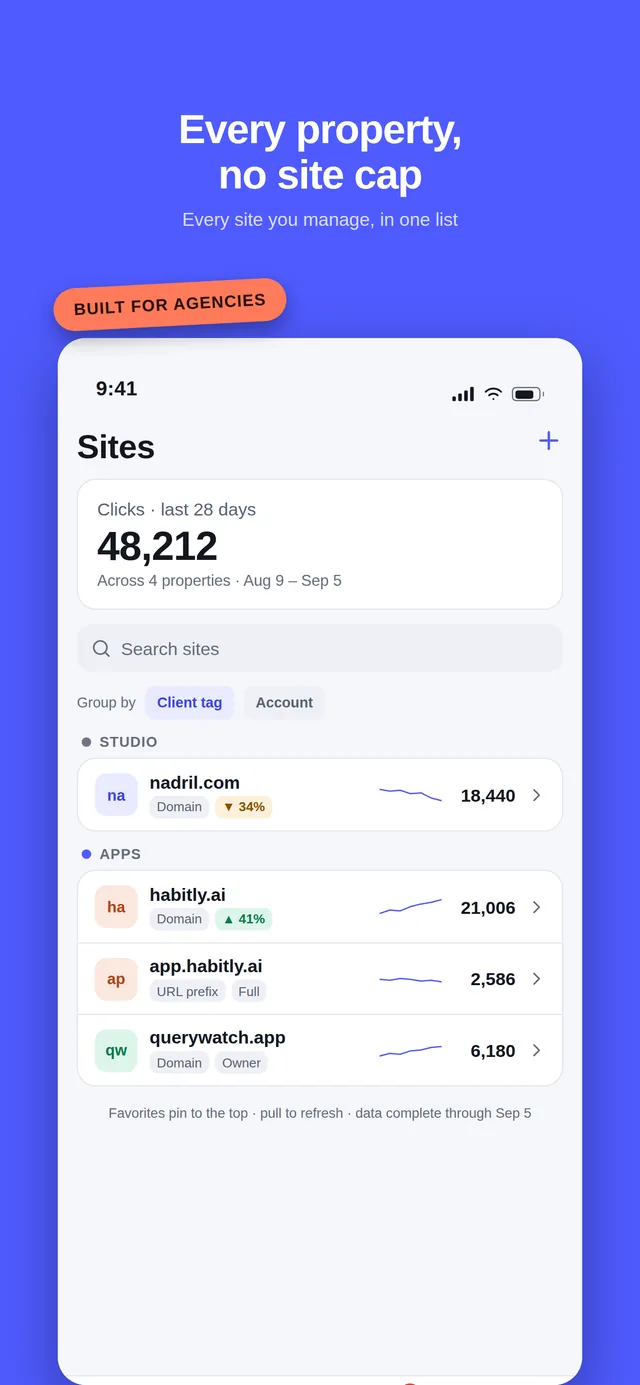
- Client tags and colours, on the free tier. Group properties by client, give each one a colour, and read the whole portfolio as one list with a sparkline and yesterday's clicks per row.
- Favourites and hidden properties. The four sites you check daily sit at the top; the dormant ones you inherited stop taking up space.
- Multiple Google accounts (Pro), because agency properties are never all under one login — some are yours, some were granted by the client.
- Permission level shown per property, so you know before you promise a client something whether you have owner or restricted access.
A week with it
Monday morning
The weekly digest lands: every property, week against previous week, queries in and out of the top 10, which alerts fired and the biggest mover. You know which two clients need a sentence in their update before you open a laptop.
Wednesday, 11:40
A push says brightloom.co clicks are down 34 percent and /pricing explains 56 percent of it. You open the change investigation on the walk back from lunch and see the page, its before and after, and the one URL that moved the other way.
Wednesday, 11:52
You email the client first. That is the entire product thesis: the difference between explaining a drop and being asked about one.
Thursday, before the call
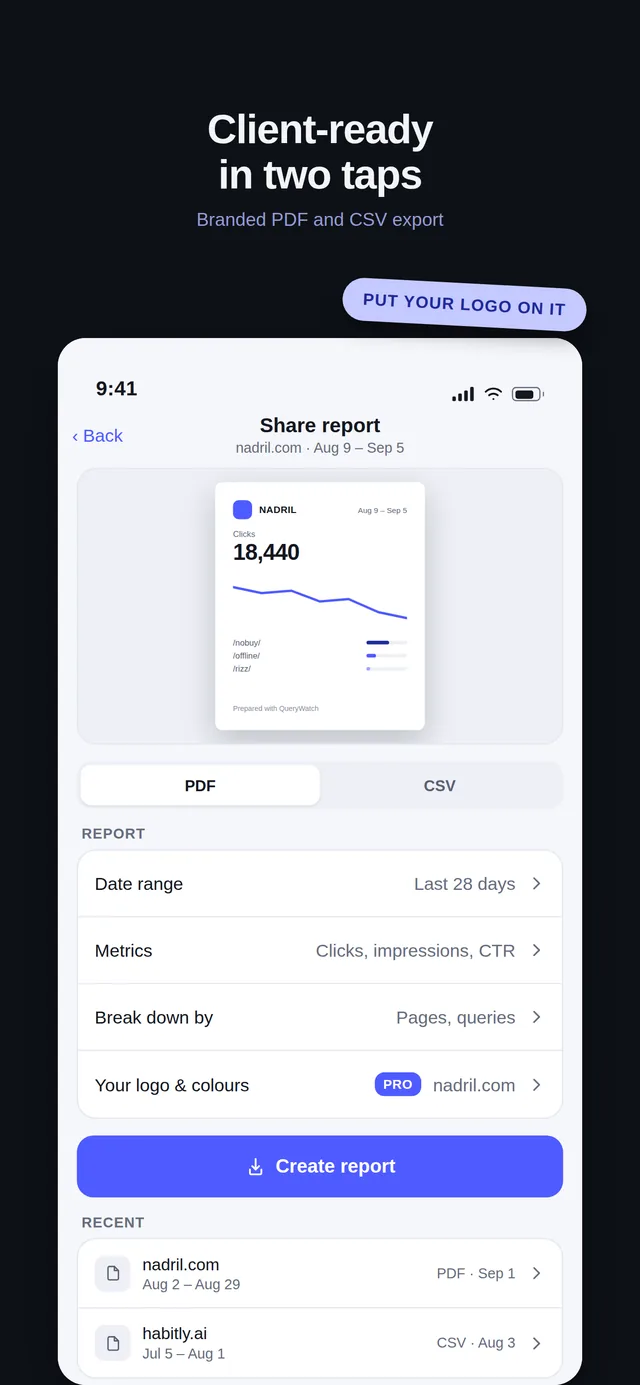
Branded PDF from the phone — property summary, trend, top queries and pages, striking distance — with their name, your logo and your colour. White-label removes our branding entirely.
Reports a client can read
A branded PDF carries the client name, your logo and your colour; the white-label option removesQueryWatch branding altogether, so what arrives is your report. It is generated on the phone using the same components the app draws with, and goes out through the normal share sheet.
CSV of whatever table you are looking at is free, with a context header row so a file sitting in a Slack thread still says which property, range and dimension it came from. The comparison CSV, with previous-period columns and per-row deltas, is Pro.
Retainer work: striking distance
The report everyone builds by hand in a spreadsheet — queries sitting at positions 8 to 20, ranked by how much traffic one more push would win — is computed on the last complete day of the property's own data, on the free tier. The cannibalization detector, which finds queries where two of your pages are competing with each other, is Pro.
Both exist because “what should we do next quarter” is a harder question to answer from a phone than “what happened yesterday”, and it is the one clients actually pay for.
What is not there yet
Being clear about this now is cheaper than disappointing you later:
- No read-only client logins. Sharing a live dashboard with a client is on the roadmap, not in the app yet. Today you send an export.
- No team seats. One person, one subscription. If three people at your agency want it, that is three subscriptions.
- No rank tracking. QueryWatch shows the average position Google reports for queries you actually appeared for. Scraping SERPs breaks Google's terms, so it is a permanent non-goal — if you need daily positions for keywords you do not yet rank for, you need a rank tracker as well as this.
- No GA4 overlay, and no Bing Webmaster Tools yet, though Bing is next on the roadmap.
Free and Pro in full
| Feature | Free | Pro · $4.99/mo or $14.99/yr |
|---|---|---|
| Properties | All of them, no cap | All of them, no cap |
| Performance data | 7, 28 and 90-day presets with deltas | 16 months, custom ranges, period comparison |
| Queries, pages, countries, devices | Top 100 rows | Top 100 rows |
| Striking distance (positions 8–20) | Included | Included |
| Change investigation | Top 3 contributors | Top 20 contributors, kept as history |
| Push alerts on traffic change | Not included | Anomaly, new top-10 query, indexing change, sitemap error |
| Weekly digest | Not included | Every Monday, per property |
| Watchlist | 5 saves | Unlimited |
| Client tags and colours | Included | Included |
| Widgets | Home Screen and Lock Screen on iPhone, home screen on Android | Home Screen and Lock Screen on iPhone, home screen on Android |
| URL inspection | 5 per day | Unlimited |
| Sitemaps | View | View, submit and delete |
| Core Web Vitals / PageSpeed | Not included | Per page |
| Exports | CSV of the current view | Comparison CSV and branded or white-label PDF |
| Cannibalization detector | Not included | Included |
| Multiple Google accounts | Not included | Included |
| Offline cache and Demo Mode | Included | Included |
Questions
Do I pay more for more client properties?
No. Pricing is per person, not per property — $4.99 a month or $14.99 a year covers every property you have access to, whether that is three or thirty.
This is deliberate. Every other app in the category either charges by site count or hides properties behind the paywall, and that is the wrong shape for agency work.
Can my client log in and see their own data?
Not yet. Read-only client sharing is on the roadmap but is not in the app today. What exists now is the export: a branded or white-label PDF, and CSV of any view.
Can I put my own branding on a report?
Yes, on Pro. A report carries the client name, your logo and your colour, and the white-label option removes QueryWatch branding entirely so what lands in the client’s inbox is yours.
Does it support more than one Google account?
Yes, on Pro. Agencies routinely have properties split across a personal account and one or more client-granted accounts, so multi-account switching is a Pro feature rather than an edge case.
Put every client property on one screen
If you manage client properties, you are the person this is built for. Every property is free with no site limit, and feedback from agency use is worth more to us than anything else right now.
iPhone needs iOS 26 or later; Android needs Android 12 or later. Free to download, with an optional Pro subscription. An independent app, not affiliated with Google.