Alerts
A notification when your search traffic moves.
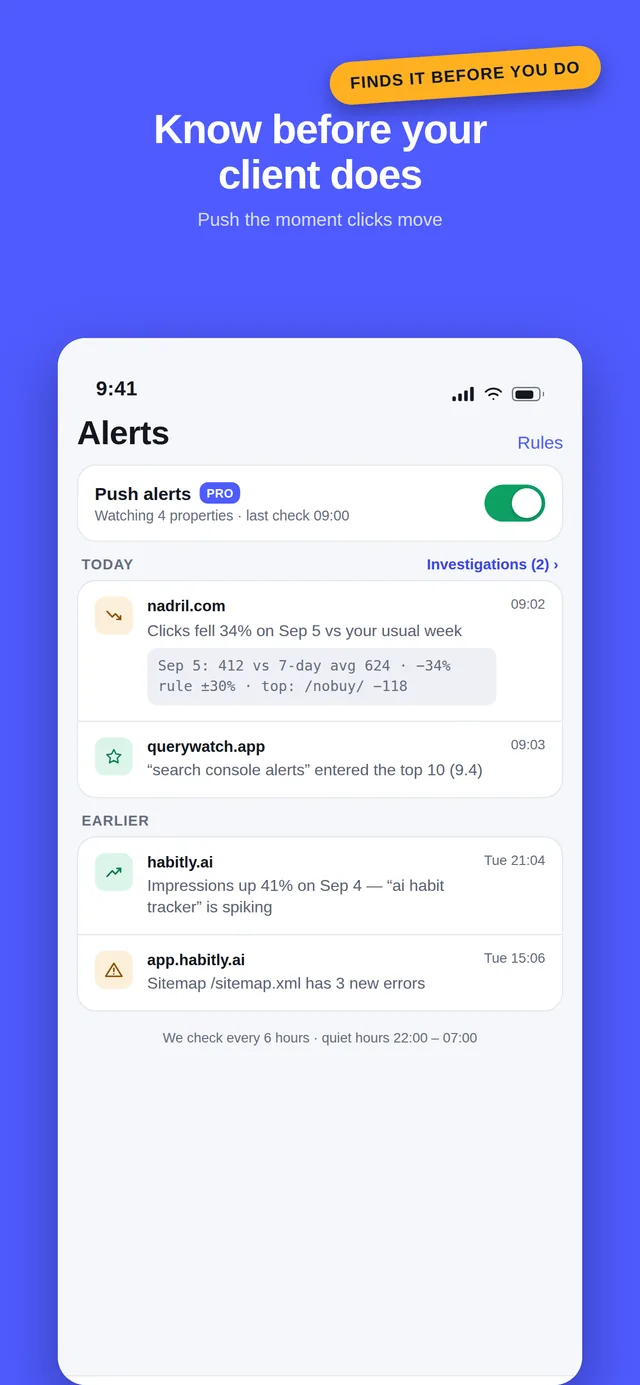
QueryWatch sends a push notification to your iPhone or Android phone when a Search Console property's clicks or impressions move outside their usual range, with the pages and queries that caused it attached. Search Console itself knows your clicks fell before you do. It has no way to tell you, so the drop waits until you next open a laptop — which is usually after the client has emailed. Alerts are the reason this app exists.
What an alert looks like
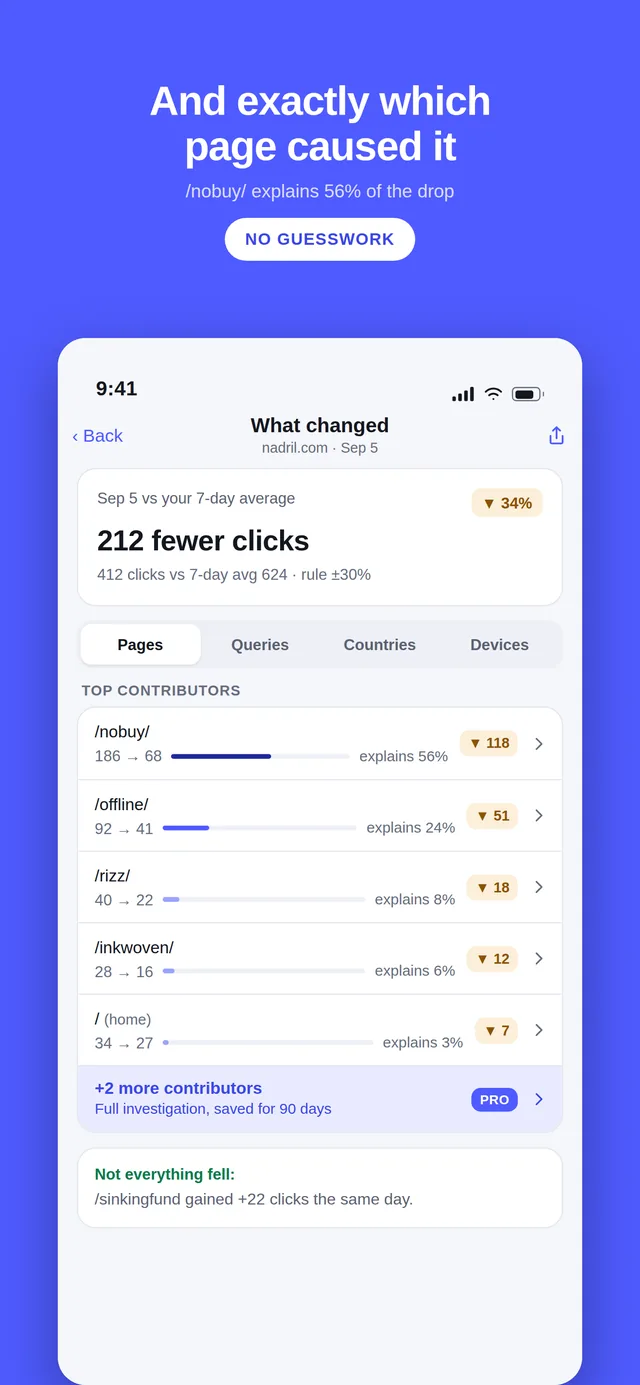
Not “something changed”. The push carries the property, the metric, the size of the move and the page that explains most of it. Opening it lands on the change investigation, which lists the top contributors with their before and after numbers and the share of the drop each one accounts for.
Every alert stores an evidence snapshot at the moment it fired — the observed value, the baseline it was compared against, the dates, the threshold that was hit and the contributors at that time. Search Console data keeps moving; a week later the alert still says exactly what it saw.
QueryWatch now
brightloom.co · clicks down 34%
412 clicks on Sunday, Sep 6 vs a usual Sunday of 624. /pricing explains 56% of it.
What changed
- /pricing186 → 68▼ -118
- /features/automations92 → 41▼ -51
- /blog/zapier-alternatives40 → 22▼ -18
Sep 6: 412 clicks vs usual Sunday 624 · −34% · rule ±30% · top: /pricing −118
What triggers one
Four rules, each switchable per property.
Traffic anomaly
Clicks or impressions on the latest complete day are at least 30 percent away from the same weekday over the previous four weeks, or at least two standard deviations from it.
Both thresholds are adjustable per property. Drops and spikes both fire — a spike is a signal too, and usually a happier one.
New query in the top 10
A query you are watching, or any query with at least 50 impressions that day, enters positions 1–10.
This is the alert that tells you a page finally landed, rather than telling you something broke.
Watched URL indexing change
A URL you marked as watched changes its index verdict or coverage state in Google’s URL Inspection results.
The one that catches a key page silently dropping out of the index, which otherwise shows up as a slow bleed in clicks.
Sitemap error
A submitted sitemap’s error count increases, or the sitemap disappears from Search Console entirely.
Usually the first sign that a deploy broke something structural.
How often it checks, and why not more often
Every six hours. It would be easy to promise a check every fifteen minutes, and it would be useless: Search Console performance data is finalised two to three days after the fact, for everyone. Polling faster does not surface a change earlier, it just re-reads the same numbers and risks alerting on a partial day.
So the comparison is always the latest complete day against the same weekday over the previous four weeks — a quiet Sunday is measured against other Sundays, not against a busy Tuesday — and there is a hard cap of one notification per property per day. An app that cries wolf gets its notifications switched off in a week, and then it is worth nothing.
Search Console's own emails are not this
Google does email you — about manual actions, security issues and large coverage changes. Those matter, and QueryWatch does not replace them. What Google does not email you about is the thing that usually costs money first: an ordinary, unexplained fall in clicks on a page that still indexes fine. No manual action, no error, nothing broken in Search Console's terms — just thirty percent less traffic.
Where your Google token lives
Honest version, because this is the part that should make you suspicious of any app that offers alerts: a notification has to be computed while your phone is asleep. A phone cannot reliably run a background job every six hours, so the check happens on a server, and that server needs permission to read your Search Console data.
So QueryWatch does this:
- Alerts off — which is the default. Your Google grant stays on the device — the Keychain on iPhone, Google Play services on Android — and never leaves it. The app talks to Google directly. There is no row about you on any server of ours.
- Alerts on. A Google credential is sent to our relay — the refresh token on iPhone, a one-time authorization code on Android that the relay exchanges for its own token. The relay is our own server in Germany, not a third-party backend, and the token is stored encrypted with libsodium, decrypted in memory only while a scheduled check runs. The app shows you exactly this, in a consent screen, before anything is sent.
- Alerts off again. The row, the rules, the watched URLs and the alert history are deleted immediately. Not archived, not soft-deleted.
The full detail is in the privacy policy, and you candelete everything without asking us.
Turning them on
- Alerts are a Pro feature. Subscribe to Pro if you have not already.
- Settings → Alerts → turn on. Read the consent screen; it is four sentences.
- Allow notifications when your phone asks.
- Pick the properties that matter and, if you want, adjust the thresholds. A site with 50 clicks a day and a site with 50,000 do not want the same rule.
The weekly digest
Alerts fire when something moves. The digest arrives every Monday whether or not anything did: clicks, impressions, CTR and position for the week against the previous one, how many queries entered or left the top 10, which alerts fired, and the biggest mover across your properties. It is templated and deterministic — no AI, no invented narrative, and the last twelve are kept so you can look back.
Questions
How often does QueryWatch check my properties?
Every six hours. Search Console data is finalised two to three days after the fact, so checking more often would only produce noise from partial days — the relay compares the latest complete day, not today.
What counts as a big enough change to notify me?
By default, a day whose clicks or impressions are at least 30 percent away from the same weekday over the previous four weeks, or at least two standard deviations from it. Both thresholds are adjustable per property, so a volatile site and a steady one can have different rules.
Will it wake me up every time a number wobbles?
No. There is a hard cap of one notification per property per day, and each day is compared with the same weekday in the previous four weeks rather than with yesterday, so ordinary weekday-to-weekend movement does not trigger anything.
Does Search Console not already email me?
It emails you about critical issues — manual actions, security problems, big coverage changes. It does not email you because Tuesday’s clicks fell 40 percent, which is the thing that usually matters first commercially.
Why does enabling alerts send my token to a server?
Because a notification has to be computed while your phone is closed, and a phone cannot reliably run a background job every six hours. The check has to happen somewhere else, which means something else needs permission to read your data.
The token is encrypted at rest, decrypted only inside the scheduled function, and deleted the moment you turn alerts off. With alerts off it never leaves your device at all.
Get QueryWatch
Free on iPhone and Android for every property you have, with no site limit. Open Demo Mode first if you want to look around before you connect a Google account.
iPhone needs iOS 26 or later; Android needs Android 12 or later. Free to download, with an optional Pro subscription. An independent app, not affiliated with Google.