Search Console on your phone
Is there a Google Search Console app?
No official one. Google has never released a Search Console app for iPhone or Android, so every app you can install is a third-party client of Google's public API. QueryWatch, which publishes this page, is one: an independent app for iPhone and Android, free for every property you have, with push alerts when traffic moves on Pro. Search Console itself lives in the browser at search.google.com/search-console.
The closest Google came was March 2024, when it tested an Android progressive web app with a small group of SEOs. It was never released, and there has been no public signal since. The Search Central blog has not announced a mobile app, no “Search Console” app has appeared under Google LLC on either store, and the mobile web interface has not gained an install prompt.
So if you searched for this because you assumed you were missing something obvious: you were not. It does not exist.
What that leaves you with
Five realistic options, and it is worth being honest that the free official one is the authoritative source for all of them:
| Option | Price | Alerts | Widgets |
|---|---|---|---|
| Search Console mobile web | Free | No | No |
| Search Console for Google | Free; $4.99/mo or $34.99/yr | Not listed | Yes |
| Search Console SEO Tracker | Free tier; Premium price not stated | Yes | Yes |
| Search Console Mobile | Free; $1.99/mo | No | No |
| Search Panel | Free; $3.99 Pro | No | No |
Read from each product’s own listing between 9 and 12 September 2026. Each linked page shows the full comparison, including what that option does better than QueryWatch.
What the mobile web can't do
Search Console is an excellent product. The gap is not the data — it is that a website cannot do the five things a phone is for:
It cannot tell you anything
The single most valuable thing a phone can do is interrupt you. Search Console’s mobile web has no push notifications for traffic changes, so a 40 percent drop waits politely until you next open a laptop.
Nothing lives on the home screen
No widget, so the answer to “how did we do yesterday” always costs a browser, a login check, a property picker and a wait.
One property at a time
The property switcher is a dropdown and a full page reload. With twenty client sites, a morning check is twenty of those.
It is a desktop UI made small
Dense tables, horizontal scrolling and controls sized for a cursor. It works, in the sense that it renders.
Nothing you would send a client
There is no export from a phone that a client could read. The report gets built later, on a laptop, in a spreadsheet.
What QueryWatch is
Native apps for iPhone (Swift and SwiftUI) and Android (Kotlin and Jetpack Compose) that sign in to your own Google account and read your own Search Console data through Google's public API. It is not a scraper, not a rank tracker, and not affiliated with Google.
It adds exactly the five things above:
- Push alerts when a property's clicks or impressions break your threshold, with the numbers that fired them attached.How the alerts work ›
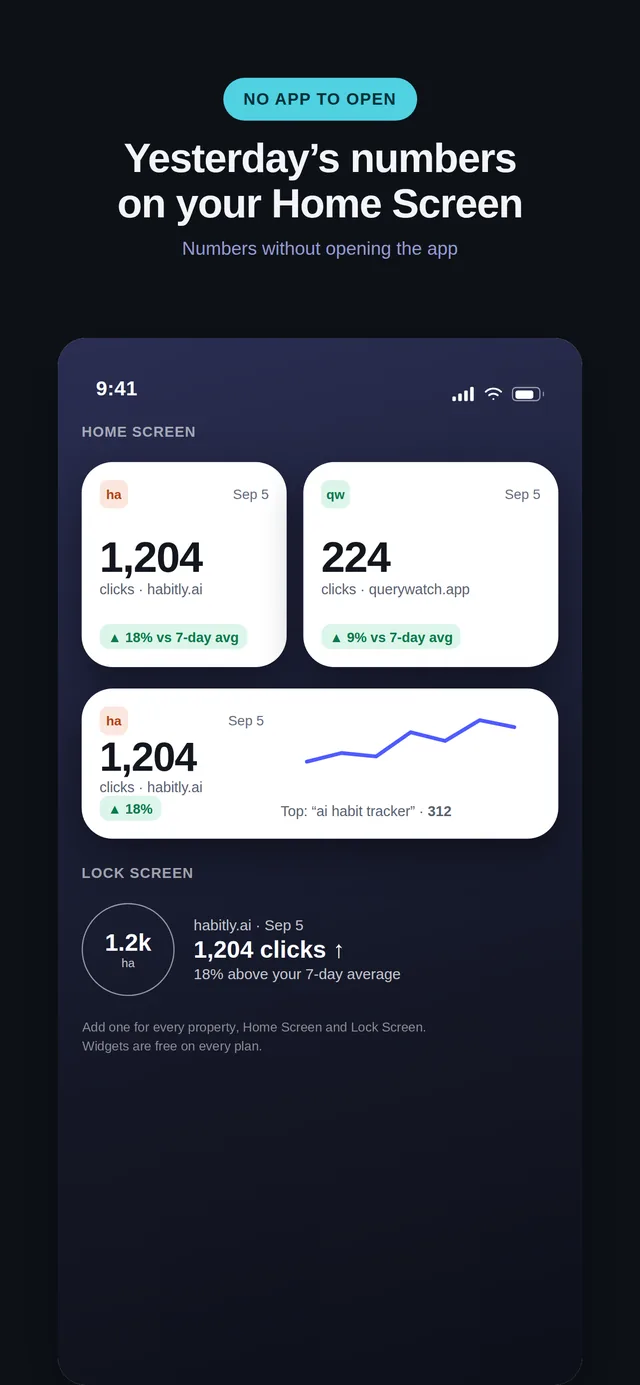
- Home-screen and Lock Screen widgets showing clicks, the delta and a sparkline.
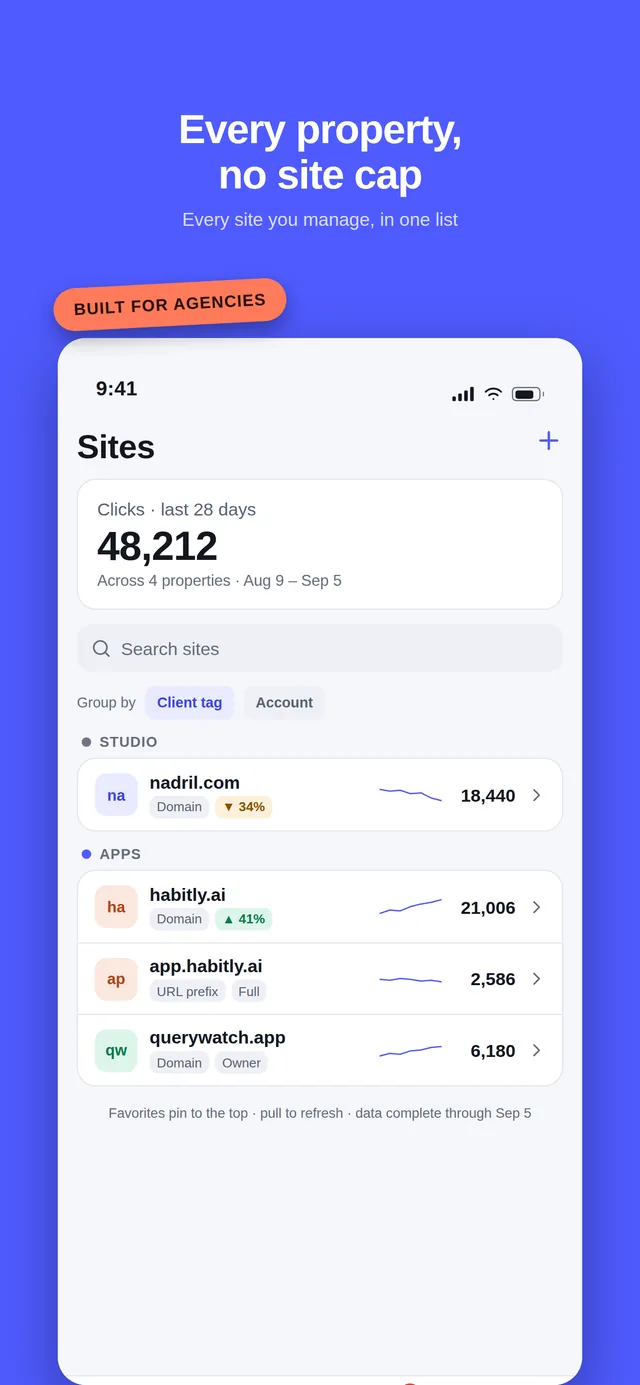
- A portfolio list — every property you have access to, in one screen, grouped by client tag and colour, each with a sparkline.
- Exports — CSV of the current view on the free tier, branded or white-label PDF on Pro. The agency workflow ›
- An offline cache, so the last data you loaded is still there on a train.
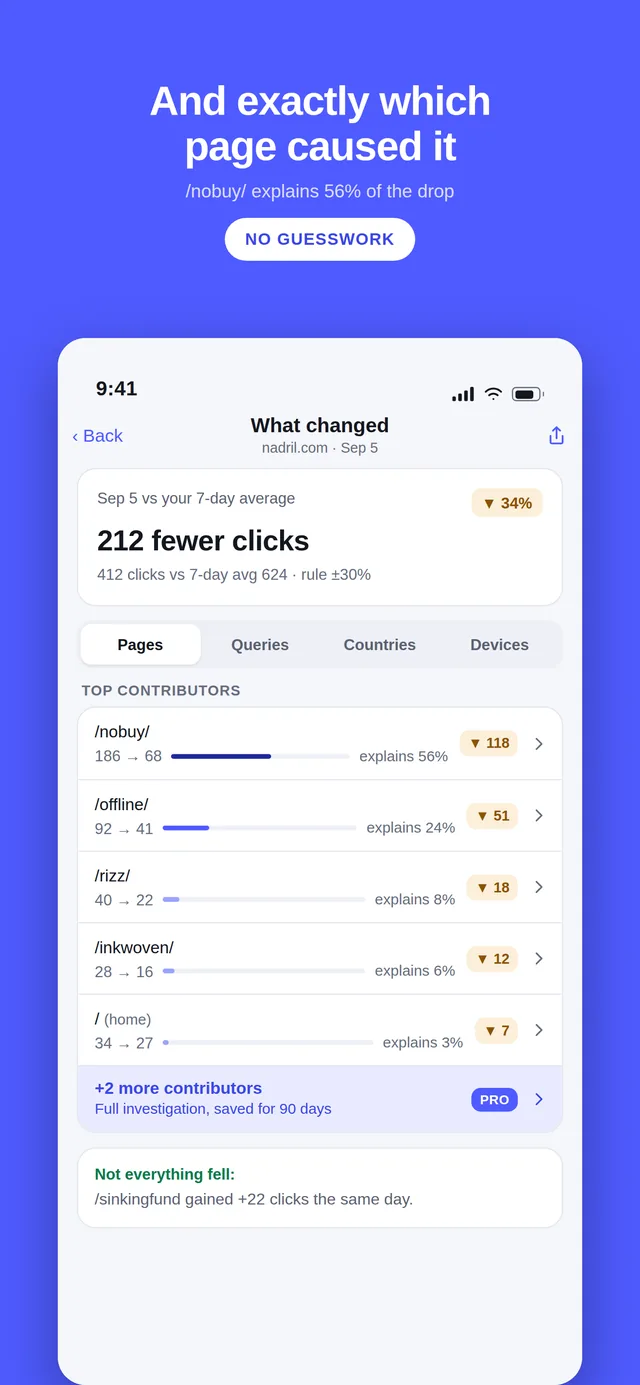
And two things the web UI genuinely does not have: a striking-distance view that ranks the queries sitting at positions 8–20 by how much one more push would be worth, andchange investigation, which answers “which pages and queries caused this drop” instead of leaving you to read a chart.
Requirements and availability
- iPhone running iOS 26 or later, or an Android phone running Android 12 or later.
- A Google account with at least one verified Search Console property. QueryWatch cannot verify a property for you — do that in Search Console first.
- Available now on the App Store and Google Play, free to download.
- Free tier covers every property with no cap. Pro is $4.99/month or $14.99/year. New subscribers can start the yearly plan with a first month for $0.99, and it renews at $14.99 a year after that.
Questions
Where can I download QueryWatch?
QueryWatch is on the App Store for iPhone (iOS 26 or later) and on Google Play for Android (Android 12 or later), listed as “QueryWatch: Search Console App”. It is free to download, and every Search Console property you have is free to view.
Is there an official Google Search Console app?
No. Google has never released a Search Console mobile app for iPhone or Android. It tested an Android progressive web app with a small group of SEOs in March 2024 and never shipped it.
The mobile web interface at search.google.com works on a phone, but it is a desktop tool in a small window: no push notifications, no home-screen widgets, and slow switching between properties.
Do I have to pay to see all of my properties?
No. Every property you have access to in Search Console is listed on the free tier, with no cap on the number of sites, and the free tier shows real data rather than a teaser.
We charge for depth, not for the number of sites: 16 months of history, push alerts, unlimited watchlist saves, exports and a few other things sit in Pro.
What does Pro cost?
Pro is $4.99 per month or $14.99 per year. New subscribers can start the yearly plan with a first month for $0.99, and it renews at $14.99 a year after that. There is no weekly plan and no free trial.
Payment is handled by Apple or Google Play through your store account, and you can cancel any time from your phone’s subscription settings.
Does QueryWatch store my Google account token?
Not by default. On iPhone your refresh token is kept in the Keychain; on Android, Google Play services hold the grant and the app never receives a refresh token. Either way the app talks to Google directly from your device.
Push alerts are the one exception, because something has to check Search Console while your phone is asleep. Turning alerts on gives our relay a credential of its own — our own server in Germany, not a third-party backend service — encrypted at rest, and turning them off deletes it immediately. The app says this before you enable anything.
Is QueryWatch made by Google?
No. QueryWatch is an independent app and is not affiliated with, endorsed by, or sponsored by Google LLC. It uses Google’s public Search Console API with your permission, and Google Search Console is a trademark of Google LLC.
Does it track my keyword rankings?
No, and it never will. QueryWatch shows the average position Google itself reports in Search Console for queries your site actually appeared for.
Scraping search results to build a rank tracker breaks Google’s terms of service, so it is a permanent non-goal for this app. If you need daily SERP positions for keywords you do not yet rank for, you need a rank tracker, not this.
Why is my data two or three days behind?
That is Google’s delay, not ours. Search Console performance data is finalised a couple of days after the fact, for everyone, in the API and in Google’s own interface alike.
QueryWatch always labels the last complete day it is showing you rather than quietly presenting a partial day as a full one.
Can I try it without connecting my Google account?
Yes. Demo Mode runs the whole app on a bundled sample dataset for four example properties, including the Pro screens, with no sign-in and a permanent banner so you always know the numbers are not yours.
Get QueryWatch
Free on iPhone and Android for every property you have, with no site limit. Open Demo Mode first if you want to look around before you connect a Google account.
iPhone needs iOS 26 or later; Android needs Android 12 or later. Free to download, with an optional Pro subscription. An independent app, not affiliated with Google.